

Blog
10 Best Regression Testing Tools in 2026

Published on
April 16, 2026

Compare the best regression testing tools in 2026, from AI-native Virtuoso QA to Selenium and Tricentis Tosca. Find the right fit for your team.
Regression testing has reached an inflection point. Organizations running 100,000+ annual tests can no longer afford the 80% maintenance overhead that plagues traditional automation frameworks.
The market now divides clearly: legacy code-dependent platforms versus AI-native solutions that autonomously generate, execute, and heal test suites.
The difference? 10x speed gains and 88% maintenance reduction. This guide compares 10 leading tools and 3 frameworks to help you choose the right approach for your team.
Before comparing platforms, here's what separates tools worth considering from those that create more work than they save.
Look for no-code test creation that lets business analysts contribute—not just developers. The tool should handle web, mobile, and API testing in one platform, with parallel execution fast enough for CI/CD pipelines.
This is where the market has split. AI-native platforms (built from the ground up around autonomous intelligence) deliver 80-90% maintenance reduction. AI-augmented tools (ML bolted onto legacy architecture) achieve 30-50%. Traditional frameworks offer 0%.
When a UI element changes, AI-native tools continue automatically. Traditional tools fail and wait for an engineer.
Creating tests is easy. Maintaining them as applications evolve is where teams drown. Traditional frameworks consume 80% of QA budgets on maintenance. AI-native platforms cut this by 88%.
The tool must plug into your CI/CD pipeline, support your enterprise applications (SAP, Salesforce, Oracle), and provide audit trails for compliance. Cloud, private cloud, and on-premises options matter for regulated industries.
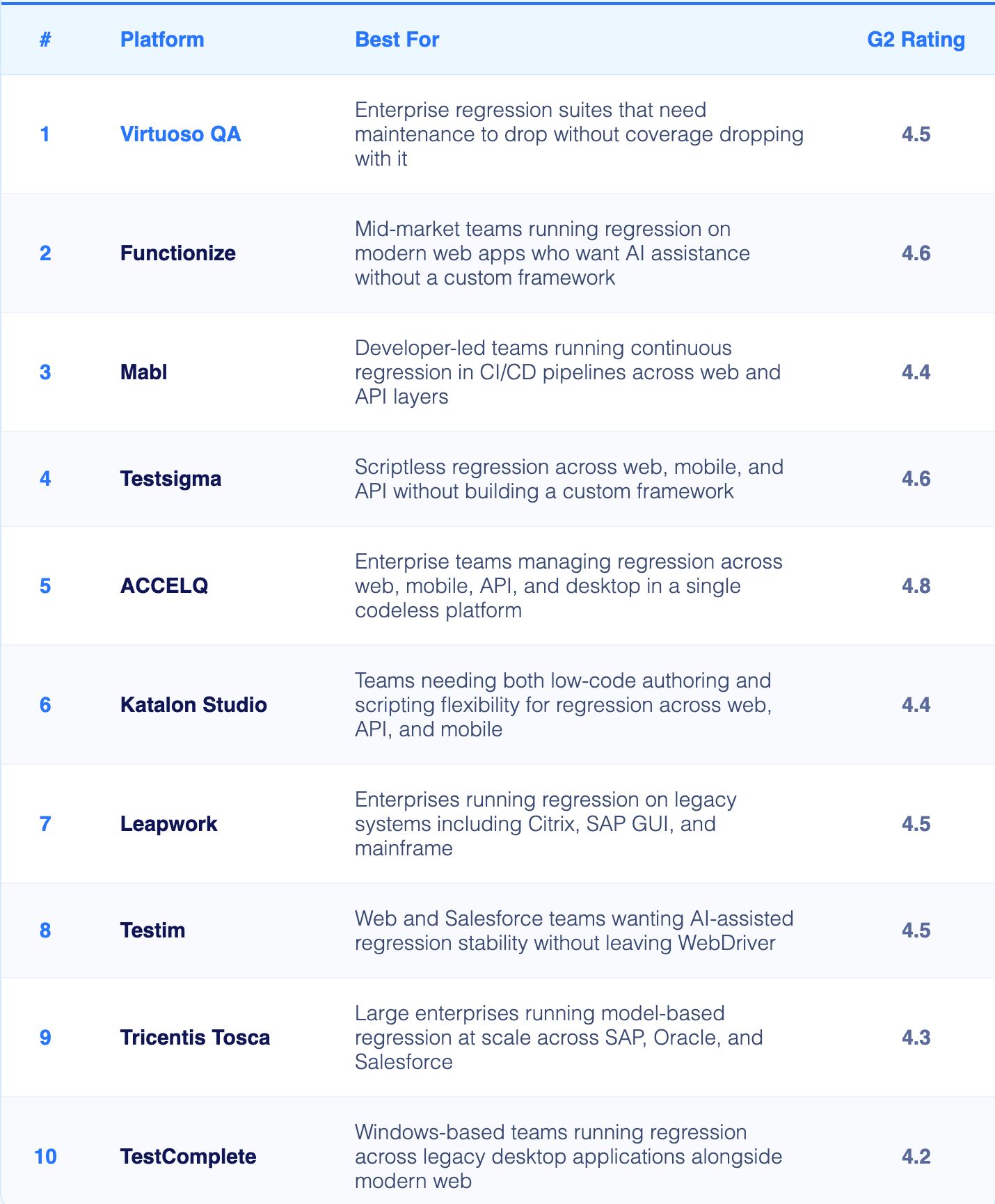
Regression testing is where most automation programmes break down. Tests that passed last sprint fail this sprint not because the application broke but because the UI shifted slightly. Virtuoso QA's self-healing engine handles approximately 95% of those changes automatically, keeping regression suites green without a team of engineers manually updating locators after every release.
Functionize reduces the regression maintenance burden through ML-powered element recognition that understands user intent rather than tracking brittle locators. When the application changes between releases, SmartFix identifies working alternatives and updates the regression test automatically.
Mabl was designed for regression in continuous delivery environments where suites must run on every commit and stay stable without constant manual attention. Its self-healing layer and CI/CD integrations are built for teams where regression is a pipeline gate, not an end-of-sprint activity.
Testsigma lets teams write regression scenarios in plain English and run them across real devices and browsers on demand. Its unified coverage across web, mobile, and API in one platform reduces the number of separate regression suites teams need to manage and maintain.
ACCELQ's model-based approach is well suited to regression because reusable test components mean that when the application changes, updating one component propagates the fix across every regression scenario that uses it. That cascade effect significantly reduces the manual effort of keeping large regression suites current.
Katalon's dual-mode authoring makes it practical for teams where some regression scenarios are simple enough to record and some require custom logic. TestOps gives QA leads centralised visibility into regression results across distributed teams without additional tooling.
Leapwork's visual flowchart approach is particularly relevant for regression in legacy enterprise environments. Its ability to automate regression on interfaces that expose no programmatic access makes it one of the few practical options for organisations with older technology estates.
Testim's machine learning layer is specifically useful for regression because it continuously evaluates which locator strategies produce the most stable results over time. Salesforce regression is a particular strength: Lightning component changes that break most tools are handled natively.
Tosca's model-based approach is designed for large regression programmes that need to stay current as complex enterprise applications evolve. Risk-based test optimisation prioritises which regression scenarios to run based on what changed, reducing regression cycle time without reducing confidence.
TestComplete handles regression across Windows desktop, web, and mobile from a single environment. For organisations where a meaningful portion of their regression suite covers legacy Windows applications, it remains one of the few practical options.

Selenium is still the foundation of more regression suites than any other technology. Its multi-language support and vast ecosystem mean almost every QA engineer has Selenium knowledge, which lowers the skill barrier to contributing to an existing regression programme even if building from scratch is expensive.
Playwright's browser context isolation makes it particularly effective for regression: each test run starts from a completely clean state, eliminating the cross-test contamination that causes false regression failures in suites that share state.
Cypress runs regression tests inside the browser, which gives it access to the same JavaScript execution context as the application. This makes it particularly reliable for regression on React, Vue, and Angular applications where timing and state management are complex.

Understanding the distinction between AI native and AI-augmented platforms is crucial for making informed tool selections.
Legacy platforms like Selenium, Cypress, and Playwright were designed in an era when human engineers wrote every line of test code. Their architecture reflects this assumption. Tests exist as scripts in programming languages (Java, Python, JavaScript). Element identification relies on static locators (IDs, XPaths, CSS selectors). When applications change, tests break, requiring manual updates. Even platforms that added "AI features" retain this fundamental dependency on coded scripts and human maintenance.
Platforms architected as AI native from inception operate differently. Virtuoso QA exemplifies this approach. Instead of code, tests are expressed in natural language that mirrors how humans describe application behavior. Element identification uses AI-powered visual recognition and context understanding, not brittle locators. When UI changes occur, machine learning models automatically adapt, healing tests without human intervention. Test generation leverages large language models to convert requirements into executable tests autonomously.
The architectural difference manifests in measurable outcomes. Traditional platforms require 5-10 specialized engineers to maintain regression suites. AI native platforms reduce this to 1-2 general QA staff. Traditional frameworks spend 80% of effort on maintenance; AI native platforms reduce maintenance to 12%, allowing 88% effort allocation to expanding coverage and adding value.
Self-healing represents the clearest architectural differentiator. When a button moves from the top-right to top-left corner of a page, traditional frameworks fail because the XPath changes. Engineers must locate the failure, update the locator, re-run tests, and validate the fix. This process repeats for every UI change across thousands of tests.
AI native platforms handle this scenario autonomously. Visual recognition identifies the button regardless of position. Natural language descriptions ("click the Submit button") remain valid despite layout changes. Machine learning models learn application patterns, predicting which elements match test intentions even when technical attributes change. Virtuoso QA's 95% self-healing accuracy means only 5% of application changes require human intervention, fundamentally altering regression testing economics.
The testing tools market is experiencing a fundamental shift comparable to the move from manual to automated testing decades ago. Organizations still debating whether to adopt AI-native testing face the same decision enterprises faced in the early 2000s about automation: adopt now and gain competitive advantage, or delay and fall behind competitors who move faster.
Enterprise software complexity grows exponentially while business demands accelerate. Applications integrate more systems, serve more users, deploy more frequently. Traditional testing approaches cannot scale to match this complexity and velocity.
Consider the mathematics. An enterprise with 50 applications, each releasing monthly, faces 600 releases annually. If each release requires 100 regression tests, the organization must execute 60,000 regression test runs yearly. With traditional frameworks requiring human maintenance for every test, this becomes impossible to sustain.
AI-native platforms transform the equation. Autonomous test generation creates comprehensive regression suites in days. Self-healing maintenance eliminates 88% of human intervention. Parallel execution compresses runtimes from days to hours. Suddenly, 60,000 annual regression runs become achievable with small QA teams.
Organizations adopting AI-native testing gain measurable competitive advantages. They release software faster because regression testing no longer creates bottlenecks. They achieve higher quality because comprehensive automated coverage catches regressions manual testing misses. They reduce costs because QA teams focus on expanding coverage rather than maintaining tests.
Most critically, they attract and retain superior talent because skilled QA professionals prefer working with cutting-edge AI platforms rather than spending 80% of their time maintaining brittle Selenium scripts.
Moving from traditional frameworks to AI-native platforms requires strategic planning but delivers rapid returns. Organizations should identify high-value applications where regression testing creates clear bottlenecks, conduct proof of concepts using actual application environments, measure results using objective metrics (maintenance reduction, test creation velocity, team productivity), calculate ROI comparing traditional framework TCO against AI-native platform TCO, and plan phased migration using tools like GENerator to convert existing test assets.
The transition typically shows ROI within 6 to 12 months as maintenance burden reduction creates immediate cost savings and velocity gains. Organizations delaying adoption face growing competitive disadvantage as competitors move faster with better quality at lower costs.
Successful regression testing platform implementations follow proven patterns that maximize value realization and minimize adoption friction.
Rather than attempting to automate everything immediately, identify three to five strategically important applications where regression testing delivers the highest business value. These might be customer-facing systems where defects cause immediate revenue impact, frequently releasing applications where manual regression creates bottlenecks, or complex business-critical systems where comprehensive test coverage provides risk reduction.
Success with initial applications builds organizational confidence, develops internal expertise, and generates proof points for broader adoption.
AI-native platforms' greatest value emerges when non-technical team members create automation. Invest in onboarding business analysts, manual testers, and domain experts, starting with simple scenarios to build confidence and progressively introducing complex features as skills develop.
Organizations achieving the highest ROI from Virtuoso QA enabled 5 to 10 times more people to create automation compared to their traditional framework approach, dramatically expanding testing capacity without proportional headcount increases.
Create small centers of excellence that develop reusable test assets, establish automation standards and best practices, provide mentoring to new users, and continuously evangelize platform capabilities. These CoEs accelerate adoption while ensuring quality and consistency.
For organizations serving multiple clients or deploying across multiple environments, composable testing delivers order-of-magnitude efficiency gains. Build master libraries of intelligent test assets once, configure for specific implementations, and realize 94% effort reduction at project level.
Regression testing value maximizes when tests execute automatically in CI/CD pipelines, providing instant feedback to development teams. Invest time in integration quality, ensuring tests trigger appropriately, execute efficiently, report clearly, and integrate with development workflows.
To know more, explore: Regression Testing in CI/CD Pipelines - Automate Quality at Every Commit
Track concrete metrics proving platform value: maintenance hours before versus after, test creation velocity improvement, regression defects caught, release cycle time reduction, and team productivity gains. Communicate these outcomes broadly to sustain organizational support and justify continued investment.

Try Virtuoso QA in Action
See how Virtuoso QA transforms plain English into fully executable tests within seconds.
