Blog

14 Best UI Testing Tools and Frameworks in 2026

Rishabh Kumar
Marketing Lead
Published on
April 16, 2026
In this Article:

Compare best UI testing tools and frameworks in 2026, from AI-native Virtuoso QA to Selenium, Playwright, and Appium. Find the right fit for your team.

User interface testing validates that applications display correctly, respond to user interactions appropriately, and provide seamless experiences across browsers and devices. Yet UI testing faces unique challenges: interfaces change constantly, elements move and redesign, tests break with every UI update. Traditional UI testing tools spend 80% of effort maintaining brittle tests. In modern times, AI native platforms fundamentally transform UI testing through 95% self-healing accuracy adapting automatically to UI changes, intelligent element identification recognizing components through visual and contextual analysis, natural language test creation eliminating coding requirements, and cross-browser execution validating consistent experiences. This analysis examines 18 leading UI testing tools, revealing why enterprises achieve 90% maintenance reduction and 10x speed gains migrating from traditional frameworks to AI native solutions.
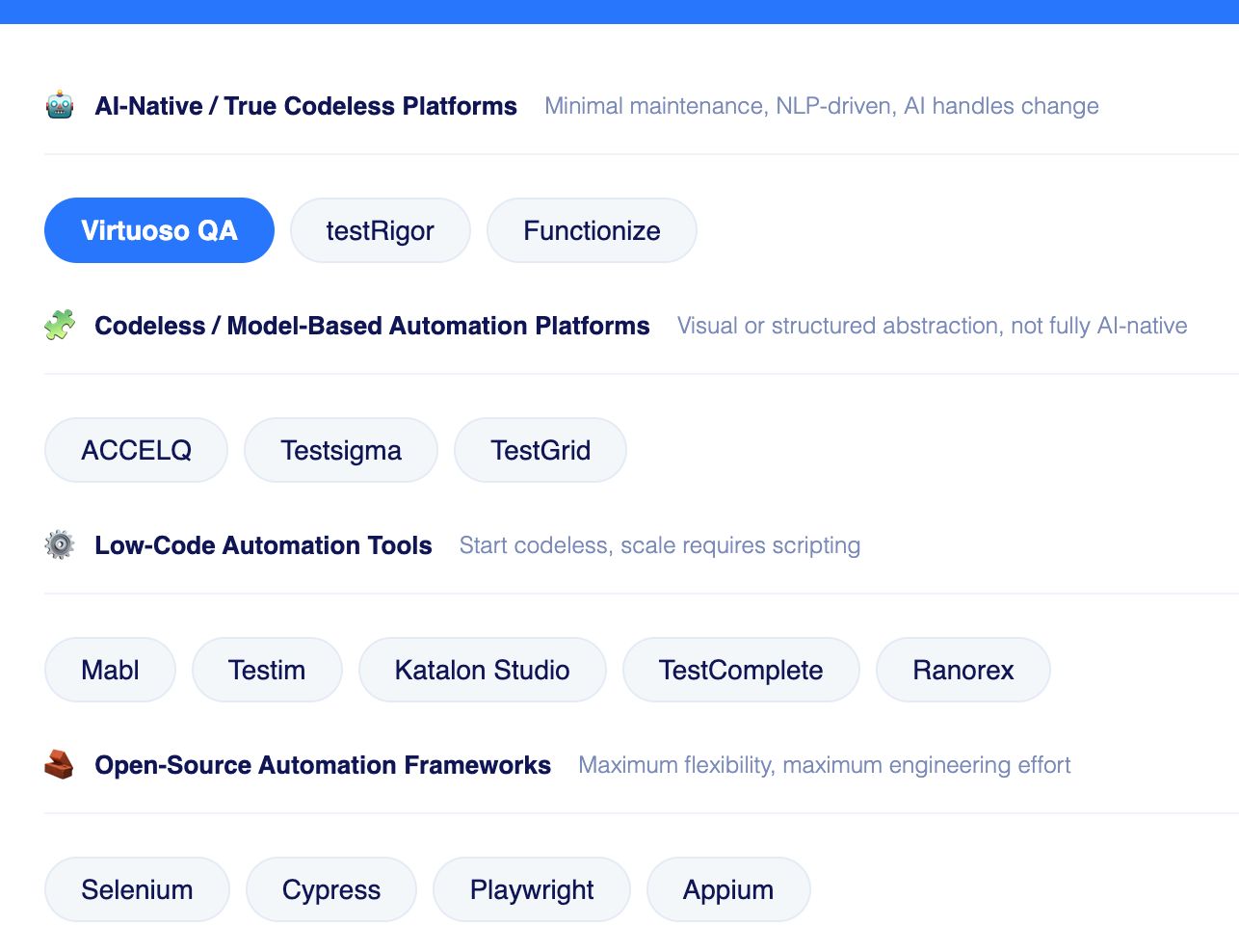
Best UI Testing Tools in 2026

UI Testing Tools and Frameworks Grouped by Category

1. Virtuoso QA: AI Native UI Testing Category Leader

Virtuoso QA is built from the ground up as an AI-native platform. Tests are written in plain English through Natural Language Programming, making authoring accessible to QA engineers, business analysts, and product owners without any scripting required. When your UI changes, Virtuoso QA adapts intelligently rather than failing.

  • Pricing: Custom enterprise pricing. Check with the Virtuoso QA sales team
  • Security: SOC 2 Type 2 certified
  • Ratings: G2: 4.5 | Gartner: 4.5
  • Best for: Enterprise teams that need AI-native UI test automation with self-healing, plain English authoring, and zero scripting requirement

Key Strengths

  • 95% self-healing accuracy: AI adapts tests automatically when UI or structure changes
  • StepIQ: autonomous test step generation from application context and user behaviour
  • GENerator: converts legacy Selenium, Tosca, and TestComplete assets in hours
  • Unified UI, API, and database testing in a single composable end-to-end journey
  • AI Root Cause Analysis with logs, network requests, and DOM comparisons on failure
  • AI Test Data Management: generates realistic parameterised data sets automatically
  • Cross-browser and cross-device testing across 2,000-plus OS and browser configurations
  • CI/CD integrations: Jenkins, Azure DevOps, GitHub Actions, CircleCI, Bamboo
  • Test management integrations: Jira, Xray, TestRail

Drawbacks:

  • Focused on web-based applications. Native desktop and mobile are on the roadmap
  • Custom pricing means engaging sales before understanding total cost

2. Functionize: NLP-Based UI Testing at Enterprise Scale

Functionize uses agentic AI to create, execute, and self-heal tests with minimal human input. Its SmartFix engine updates locators automatically when UI structures shift, and natural language inputs let both technical and non-technical contributors define tests without scripting.

  • Ratings: G2: 4.6 | Gartner: 4.2
  • Best for: Enterprise teams wanting fully autonomous UI test creation and execution driven by AI agents

Key strengths:

  • AI test creation from natural language with no scripting required
  • SmartFix self-healing that updates locators automatically on UI change
  • Visual regression detection alongside functional and regression coverage
  • Parallel cloud execution with CI/CD integrations for Jenkins and Jira

Drawbacks:

  • UI-focused scope; separate tooling needed for API and database validation
  • Custom-only pricing slows procurement for teams needing upfront clarity
  • No composable architecture or legacy migration tooling equivalent to GENerator

3. ACCELQ: Codeless, Cloud-Native End-to-End Automation

ACCELQ delivers codeless automation across web, mobile, API, and desktop from a single environment. Its self-healing engine adjusts test logic dynamically when UIs change, and a model-based approach allows reusable components to assemble into complex scenarios without coding.

  • Platform: Cloud SaaS with on-premises option
  • Ratings: G2: 4.8 | Gartner: 4.5
  • Best for: Teams needing codeless UI automation across web, mobile, and desktop from a single governed platform

Key strengths:

  • True no-code flows across web, mobile, API, and desktop
  • AI self-healing that automatically adjusts test logic to UI changes
  • Built-in test management with requirements and defect traceability
  • Tight CI/CD integrations including Jira, Jenkins, and Azure DevOps

Drawbacks:

  • Advanced flows and reusable components take time to fully master
  • Performance can slow for very large suites or complex reports
  • Pricing details require a sales conversation, which slows evaluation

4. Mabl: AI-native low-code testing across web and APIs

Mabl delivers low-code AI-native automation designed for continuous delivery pipelines. Its self-healing engine updates tests automatically when UI structures shift, and parallel checks for performance, accessibility, and visual consistency provide broad quality intelligence during execution.

  • Platform: Cloud SaaS
  • Ratings: G2: 4.4 | Gartner: 4.7
  • Best for: Developer-led teams running continuous UI testing in CI/CD pipelines with low-code authoring

Key strengths:

  • Low-code test creation via the Mabl Trainer recorder
  • AI-powered auto-healing for selectors and timing issues
  • Unified coverage for browser, API, and mobile web testing
  • Deep CI/CD integrations and collaboration-oriented workflows

Drawbacks:

  • No open-source version; licensing costs are a barrier for budget-sensitive teams
  • Less composable architecture for enterprise-scale test reuse
  • Lacks the legacy migration tooling and unified API plus database depth of Virtuoso QA

5. TestGrid: Unified Test Infrastructure

TestGrid is a software testing platform built around real-device infrastructure, combining device cloud, automation execution, and AI-driven testing into a single system. It supports testing across web, mobile, API, and performance layers, allowing teams to run tests on actual devices and browsers instead of simulated environments.

  • Platform: Cloud SaaS
  • Ratings: G2: 4.7
  • Best for: Teams that need UI testing across real devices with AI-assisted test generation built into the platform

Key Strengths

  • Broad, production-like coverage: Access 1000+ real Android and iOS devices across OS versions, screen sizes, and environments
  • Embedded test intelligence: AI-driven test generation, maintenance, and self-healing through CoTester, built into the testing workflow
  • Framework compatibility: Get native support for Selenium, Appium, and Cypress, allowing existing test suites to run without migration

Key Limitation

  • Initial complexity: Initial learning curve that can be eased by support and documentation

6. testRigor: Plain-English AI-Driven Functional Test Automation

testRigor builds automated tests entirely in plain English using semantic references instead of XPath or CSS paths, making tests resilient to UI restructuring. It handles complex scenarios including 2FA, email verification, and cross-platform validation.

  • Platform: Cloud SaaS; web, mobile, and desktop
  • Ratings: G2: 4.7 | Gartner: 4.6
  • Best for: Non-technical QA teams who need to automate UI workflows in plain English without managing locators

Key strengths:

  • Plain-English steps accessible to non-technical contributors
  • Stable semantic references instead of brittle XPath or CSS paths
  • Supports complex scenarios including 2FA and email verification

Drawbacks:

  • Less flexible for teams needing custom-coded logic or advanced assertions
  • Complex conditional logic can be difficult to express in plain English

7. Testsigma: Cloud-Based Scriptless Testing

Testsigma offers scriptless test creation in simple English with cloud-based execution across browsers, real devices, and desktop. Its unified coverage across web, mobile, API, and desktop from a single platform reduces toolchain fragmentation.

  • Platform: Cloud SaaS; web, mobile, API, and desktop
  • Ratings: G2: 4.6 | Gartner: 4.7
  • Best for: Teams wanting scriptless UI test creation across web, mobile, and desktop with cloud execution on demand

Key strengths:

  • Plain-English authoring accessible to non-technical contributors
  • Unified coverage across web, mobile, API, and desktop from one platform
  • Cloud execution across thousands of real devices and browsers on demand

Drawbacks:

  • Self-healing capabilities still developing relative to leading AI-native platforms
  • Less composable architecture for large-scale enterprise test reuse
  • Smaller community and ecosystem than established alternatives

8. Katalon Studio: All-in-one testing platform

Katalon combines low-code recording with full scripting on Selenium and Appium foundations. TestOps provides centralised orchestration and analytics. StudioAssist converts natural language into scripts. Strong integration ecosystem, but test assets are tied to Katalon's proprietary format.

  • Platform: Desktop app (Windows, macOS, Linux) plus cloud services
  • Ratings: G2: 4.4 | Gartner: 4.5
  • Best for: Teams that need both recorder-based and scripted UI test authoring in one platform across web, mobile, and API

Key strengths:

  • Record-and-playback plus full scripting in one environment
  • TestOps analytics and orchestration for distributed teams
  • Rich integrations with CI/CD, Jira, and source control

Drawbacks:

  • Significant vendor lock-in; migrating test assets requires substantial refactoring
  • Pricing tiers become complex as teams scale beyond basic usage
  • Maintenance overhead remains; self-healing is not as mature as dedicated AI-native platforms

9. TestComplete: Commercial Desktop, Web, and Mobile UI Automation

TestComplete supports desktop, web, and mobile automation from a single Windows-based environment with both codeless recording and scripting. It sits within the SmartBear ecosystem alongside Zephyr and AlertSite.

  • Platform: Windows desktop app; web, mobile, and Windows desktop testing
  • Ratings: G2: 4.2 | Gartner: 4.3
  • Best for: Windows-centric teams testing legacy desktop UI applications alongside modern web and mobile

Key strengths:

  • Mixed script and no-code support in a single tool
  • Strong legacy Windows desktop coverage including WinForms and WPF
  • Tight integration with SmartBear ecosystem including Zephyr and AlertSite

Drawbacks:

  • Authoring restricted to Windows; not viable for macOS or Linux teams
  • Significant vendor lock-in; migration requires substantial refactoring
  • Licensing is among the highest in the market

10. Ranorex: Windows-Centric Visual UI Test Automation

Ranorex delivers cross-platform automation through codeless recording and C#/VB.NET scripting. Its object recognition engine handles legacy Windows desktop alongside modern web interfaces.

  • Platform: Windows desktop app, mobile via device farms
  • Ratings: G2: 4.2 | Gartner: 4.7
  • Best for: Enterprise teams testing complex Windows desktop UI applications alongside web interfaces

Key strengths:

  • Accurate object recognition across complex UI technologies
  • Support for legacy Windows desktop stacks including WinForms and WPF
  • Built-in reporting with screenshot-level detail

Drawbacks:

  • Authoring and IDE are Windows-only; not viable for macOS or Linux teams
  • Better suited to desktop-heavy environments than fast-moving web release cycles

11. Testim: AI-powered web and Salesforce test authoring

Testim enhances Selenium and WebDriver with machine learning that adapts tests to UI changes. Its self-healing engine updates locators automatically on failure, and its Salesforce-specific optimisations make it a strong fit for teams running significant automation on Salesforce Lightning.

  • Platform: Cloud SaaS with browser extension for authoring
  • Ratings: G2: 4.5 | Gartner: 4.7
  • Best for: Web and Salesforce teams wanting AI-assisted UI test stability with self-healing on WebDriver foundations

Key strengths:

  • AI smart locators that self-heal when UI changes occur
  • Agentic AI test generation from natural language descriptions
  • Salesforce-aware testing with Lightning component optimisations

Drawbacks:

  • No open-source edition; costs can be significant for high-volume usage
  • Very small public review base; independent evaluation is essential
  • Coverage strongest for Salesforce and standard web; niche stacks may show gaps

Popular UI Testing Frameworks

1. Selenium: The Foundational Open-Source Web Browser Automation Framework

Selenium remains the most widely deployed automation technology in the industry, offering unmatched flexibility across six programming languages and a vast ecosystem. Its strength is also its cost: without self-healing, locator maintenance at scale is a constant burden.

  • Platform: Open-source; Windows, macOS, Linux
  • Best for: Engineering teams with existing Selenium investment who need maximum flexibility across languages and browsers

Key strengths:

  • Multi-language support across Java, Python, C#, Ruby, JavaScript, and Kotlin
  • Massive community, ecosystem, and long-term vendor-neutral stability
  • Strong cross-browser coverage across Chrome, Firefox, Safari, and Edge

Drawbacks:

  • No built-in self-healing; locator maintenance is a constant cost at scale
  • Reporting, dashboards, and test management must be assembled from third-party tools
  • Strong coding skills and framework architecture are mandatory prerequisites

2. Cypress: Developer-First Javascript Web Automation Framework

Cypress runs tests inside the browser alongside the application, eliminating WebDriver delays and timing-based flakiness. Excellent for modern JavaScript web apps, but a framework rather than a platform: all tests must be written in JavaScript or TypeScript.

  • Platform: Open-source on Node.js; Windows, macOS, Linux
  • Best for: Frontend JavaScript developers who need fast, reliable UI test feedback within their existing development workflow

Key strengths:

  • Real-time test runner with time-travel debugging
  • Network stubbing and request interception built in
  • Active community with excellent documentation for modern JS frameworks

Drawbacks:

  • JavaScript and TypeScript only; excludes non-developer QA contributors
  • No native mobile support, built-in self-healing, or test management layer
  • Large parallel runs require pairing with a separate cloud grid

3. Playwright: Microsoft's Cross-Browser UI Testing

Playwright solves Selenium's most persistent problems: automatic waiting, fast isolated parallel execution, and bundled browser binaries that remove driver conflicts. The preferred framework for engineering-led teams, but teams must design their own structure, reporting, and maintenance strategy from scratch.

  • Platform: Open-source; Node.js, Python, Java, .NET on Windows, macOS, Linux
  • Best for: Engineering-led teams building cross-browser UI test suites who need modern debugging and isolated parallel execution

Key strengths:

  • Auto-waiting and flake reduction baked into the runner
  • Cross-browser support across Chromium, Firefox, and WebKit from one API
  • Rich tooling including trace viewer, HTML reports, and code generation

Drawbacks:

  • No low-code authoring; all tests written in code by engineering-skilled contributors only
  • No built-in self-healing; UI changes require manual locator updates
  • Framework architecture, reporting, and test management must all be built internally

4. Appium: Open-Source Cross-Platform Mobile UI Automation

Appium provides a unified WebDriver API for automating native, hybrid, and mobile web apps across iOS and Android from a single codebase. The established open-source standard for mobile automation, but requires significant engineering investment to configure and scale.

  • Platform: Open-source; Windows, macOS, Linux
  • Ratings: G2: 4.4 | Gartner: 4.4
  • Best for: Mobile engineering teams automating UI tests across iOS and Android native, hybrid, and mobile web applications

Key strengths:

  • True cross-platform mobile support for iOS and Android from one API
  • Multi-language support across Java, Python, JavaScript, and C#
  • Large open-source ecosystem with community plugins and examples

Drawbacks:

  • Complex setup requiring SDK, driver, and device farm configuration
  • No built-in self-healing; locator breakage is frequent as apps evolve
  • Reporting, analytics, and test management must all be built separately

CTA Banner

Understanding UI Testing Challenges and Solutions

UI testing validates user-facing application layers: visual elements display correctly, buttons and forms function appropriately, navigation flows work seamlessly, responsive designs adapt to screen sizes, and cross-browser consistency delivers uniform experiences.

The UI Testing Maintenance Crisis

UI changes constantly. Product teams redesign interfaces, marketing updates landing pages, developers refactor components. Every change breaks traditional UI tests. Buttons move location, element IDs change, page layouts redesign, causing test failures despite no functional defects. Organizations spend 80% of UI testing effort maintaining tests rather than expanding coverage.

AI Native UI Testing Revolution

AI native platforms eliminate maintenance burden through 95% self-healing accuracy. When UI elements move or change, AI-powered identification recognizes components through visual analysis, context understanding, and semantic recognition, updating tests automatically.

Related Reads

Frequently Asked Questions

How does AI improve UI testing?
AI improves UI testing through 95% self-healing accuracy adapting automatically to UI changes, intelligent element identification recognizing components through visual analysis rather than brittle locators, natural language test creation eliminating coding requirements, autonomous test generation creating UI validation from requirements, and AI root cause analysis diagnosing failures automatically, reducing maintenance by 90% and enabling 10x speed gains.
What is self-healing in UI testing?
Self-healing enables UI tests to automatically adapt when interfaces change without manual updates. When elements move, change attributes, or redesign, AI-powered identification recognizes components through visual analysis, contextual understanding, and semantic recognition, updating test automation automatically. Virtuoso QA's 95% self-healing accuracy means only 5% of UI changes require human intervention versus 100% manual maintenance with traditional frameworks.
Can non-technical team members create UI tests?
With AI native platforms using natural language like Virtuoso, yes completely. Business analysts, manual testers, and domain experts create UI tests by describing user interactions in plain English without coding. Healthcare companies enabled non-technical teams to create 6,000 automated UI tests. Traditional frameworks requiring Selenium, Playwright, or JavaScript coding limit UI testing to specialized engineers.
What is cross-browser UI testing?
Cross-browser UI testing validates applications render correctly and function consistently across different browsers (Chrome, Firefox, Safari, Edge), operating systems (Windows, macOS, Linux, iOS, Android), and device types (desktop, tablet, mobile). Modern platforms provide cloud infrastructure executing UI tests across thousands of browser and device configurations without maintaining physical test labs.
How do you measure UI testing effectiveness?
Measure UI testing effectiveness through visual coverage (percentage of UI components with validation), cross-browser coverage (browsers and devices tested), maintenance burden (effort spent updating tests), defect detection rate (visual and functional issues caught), and automation percentage (ratio of automated to manual UI testing). Platforms with 95% self-healing accuracy and 90% maintenance reduction demonstrate superior effectiveness.

What is visual UI testing?

Visual UI testing uses computer vision and AI to validate how applications render visually, detecting layout shifts, color changes, font variations, missing images, and rendering inconsistencies invisible to traditional functional assertions.

Subscribe to our Newsletter

Codeless Test Automation

Try Virtuoso QA in Action

See how Virtuoso QA transforms plain English into fully executable tests within seconds.

Try Interactive Demo
Schedule a Demo