

Blog
Best Salesforce Testing Tools: Find the Right Fit
.png)
Published on
April 12, 2026

Compare the top Salesforce test automation tools in 2026. Find the right tool, from AI-native to open-source, based on your team size and tech stack.
Salesforce is not a simple application to test. Between Lightning Web Components, Shadow DOM, three major platform releases every year, and the deep customisations that make each organisation's implementation unique, the wrong testing tool does not just slow your team down. It collapses under the weight of the platform entirely.
Choosing the right Salesforce test automation tool is therefore one of the most consequential decisions a QA team can make. The wrong choice leads to brittle scripts, constant maintenance cycles, and a testing programme that struggles to keep pace with every seasonal release. The right choice keeps your Salesforce workflows stable, your release cycles predictable, and your QA team focused on coverage rather than script repair.
This guide breaks down the leading Salesforce test automation tools, what each one does well, where each one has limits, and how to select the right fit for your organisation's size, technical capability, and testing objectives.
Before comparing tools, it helps to understand why standard web application testing tools so often fail on Salesforce. The platform introduces three technical characteristics that break conventional automation:
Any tool you evaluate must address all three of these challenges. Tools that do not are unsuitable for Salesforce testing at enterprise scale, regardless of their general web testing capabilities.
Use these criteria when comparing options:
Can the tool locate and interact with elements inside Salesforce Lightning components without custom workarounds?
Does the tool automatically adapt when UI elements change across Salesforce releases, or does every update require manual script repair?
Can Salesforce admins and business analysts write and maintain tests, or does the tool require engineering expertise to operate?
Can the tool validate complete end-to-end journeys that span Salesforce and integrated systems such as ERP platforms, marketing tools, and financial applications?
Does the tool trigger tests automatically on metadata deployments and feed results into your existing DevOps pipeline?
Does the tool support Salesforce's mandatory 75% Apex coverage requirement, which blocks production deployments if unmet?
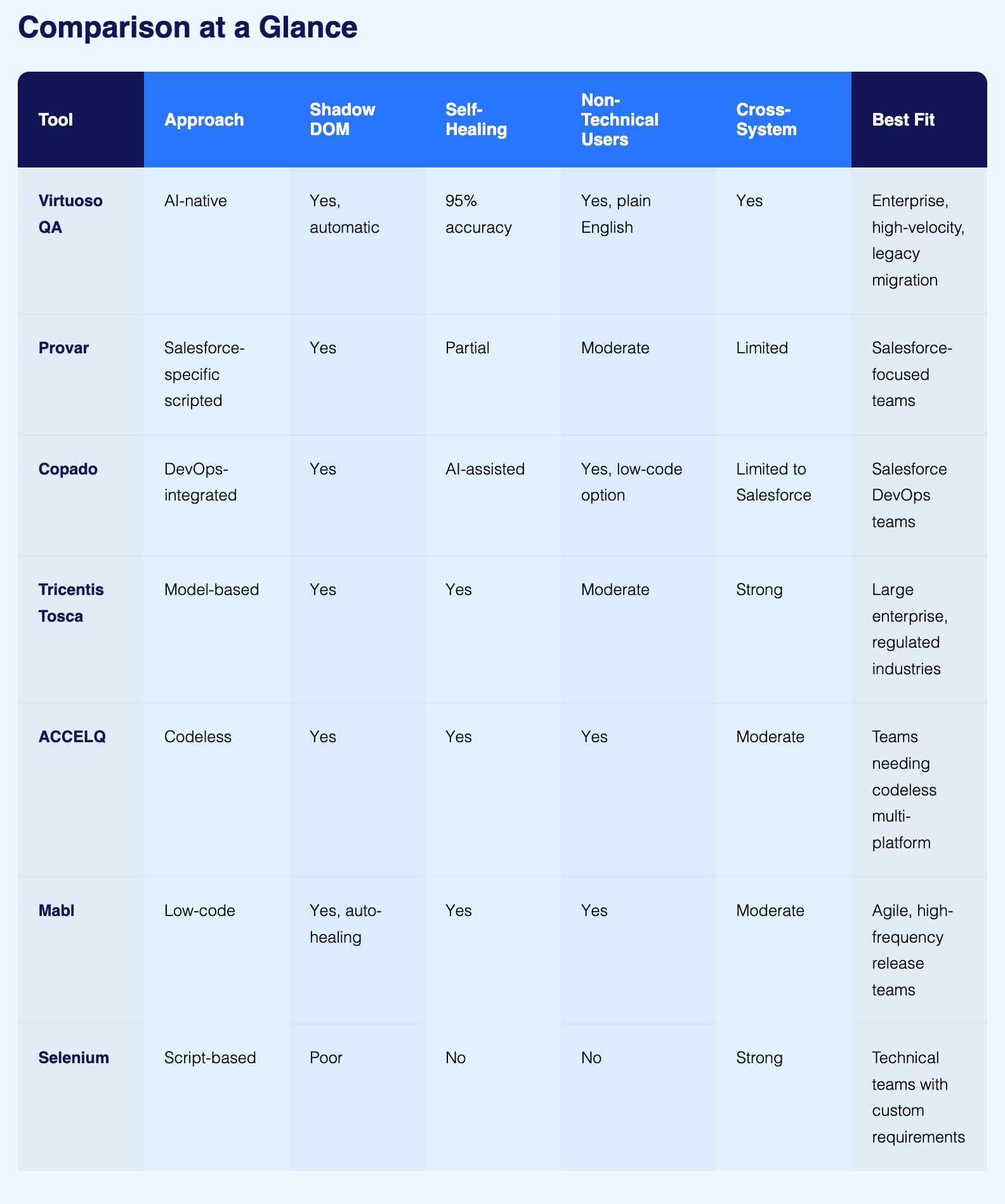
Best for: Enterprise teams needing AI-native automation with minimal maintenance overhead
Virtuoso QA is an AI-native test automation platform built from the ground up with natural language processing and machine learning at its core. It is not a conventional tool with AI features added on top. The entire platform is architected around AI, which is what makes it particularly well-suited to Salesforce's dynamic, update-heavy environment.
Virtuoso QA's AI augmented object identification automatically resolves elements within Salesforce Lightning's Shadow DOM without requiring manual locator configuration. When Salesforce releases an update that changes component structures, Virtuoso QA's self-healing engine detects the change and adapts the affected tests automatically, achieving approximately 95% accuracy in self-healing scenarios. This means QA teams spend their time expanding coverage rather than repairing scripts after every seasonal release.
Test authoring happens in plain English through the StepIQ engine. A Salesforce admin can write a test step that reads "Create opportunity with products and submit for approval" without writing a single line of code. The Virtuoso QA's GENerator capability converts existing Salesforce documentation, business requirements, and legacy test scripts directly into executable automated tests, cutting migration time from months to weeks.
For teams with existing automation built on Selenium, Tosca, or other frameworks, GENerator converts those legacy assets into natural language Virtuoso journeys that are immediately executable and self-healing from day one.
Where to consider alternatives: Virtuoso QA focuses on web-based Salesforce applications. Teams with significant native mobile testing requirements outside of Salesforce may need to complement it for those specific scenarios.
Best for: Teams wanting a Salesforce-dedicated tool with deep metadata integration
Provar is purpose-built for Salesforce, which means it understands the platform's object model, metadata structure, and component types at a level that general-purpose tools do not. Its interface is designed around Salesforce terminology, making it relatively accessible to Salesforce-focused QA teams even without deep coding expertise.
Consideration: Complex end-to-end workflows that span Salesforce and external systems often require additional scripting or supplementary tools to manage the integration layer. Teams whose testing scope extends significantly beyond Salesforce may find this limiting.
Best for: Teams that want Salesforce DevOps and testing managed in a single platform
Copado integrates test automation directly into Salesforce DevOps workflows, combining CI/CD pipeline management with quality assurance in one environment. For teams that want to manage the full deployment and testing lifecycle without switching between tools, Copado's native Salesforce alignment is a practical advantage.
Consideration: Copado is built for the Salesforce ecosystem. Organisations whose end-to-end testing spans significant non-Salesforce systems may encounter limitations in cross-platform coverage, requiring additional tooling for those integration points.
Best for: Large enterprises with complex multi-application environments and regulated industry requirements
Tricentis Tosca uses a model-based test automation approach that creates a dynamic representation of application elements rather than relying on static scripts. This model adapts when applications change, providing a degree of resilience that script-based frameworks cannot match.
Consideration: Tosca carries a significant implementation investment in terms of time, cost, and training. Teams without prior experience with model-based testing frameworks typically face a meaningful learning curve before achieving productive output.
Best for: Teams seeking codeless Salesforce automation with broad ecosystem coverage
ACCELQ provides a codeless test automation platform that supports both Salesforce Lightning and Classic without requiring testers to write scripts. Its design-first approach builds modularity into the test architecture from the start, which reduces the accumulation of fragile, hard-to-maintain test assets over time.
Consideration: Integrating ACCELQ with highly customised legacy systems or non-standard enterprise architectures may require additional configuration effort beyond standard Salesforce testing scenarios.
Best for: Agile teams running high-velocity release cycles across web applications
Mabl is a low-code test automation platform oriented toward speed of test creation and continuous integration across development cycles. It offers Salesforce-specific auto-healing that automatically identifies and adjusts to dynamic elements within Salesforce's Shadow DOM, which makes it more reliable on Lightning pages than general-purpose tools.
Consideration: For very large enterprise testing programmes that require comprehensive cross-system end-to-end coverage, mabl may need to be supplemented with additional tooling to achieve full coverage across complex integration landscapes.
Best for: Technical teams that need maximum flexibility and have strong engineering resources
Selenium is the most widely adopted open-source browser automation framework. It supports multiple programming languages, integrates with virtually every CI/CD system, and has the largest community of any testing framework. For teams with strong engineering capability and specific requirements that no off-the-shelf tool addresses, Selenium provides a foundation that can be shaped to almost any need.
Consideration: Selenium has poor native support for Salesforce's Shadow DOM, requiring significant custom engineering to handle Lightning components reliably. Tests require advanced coding skills to write and maintain. Every Salesforce platform update risks breaking locators and demanding manual script repair. Teams that adopt Selenium for Salesforce typically report spending 60 to 80% of their automation time on maintenance rather than new coverage, which undermines the value of the investment over time.
The right tool comes down to three factors: your team's technical capability, the scope of your Salesforce implementation, and the pace at which your organisation releases. Use the scenarios below to identify where you fit.
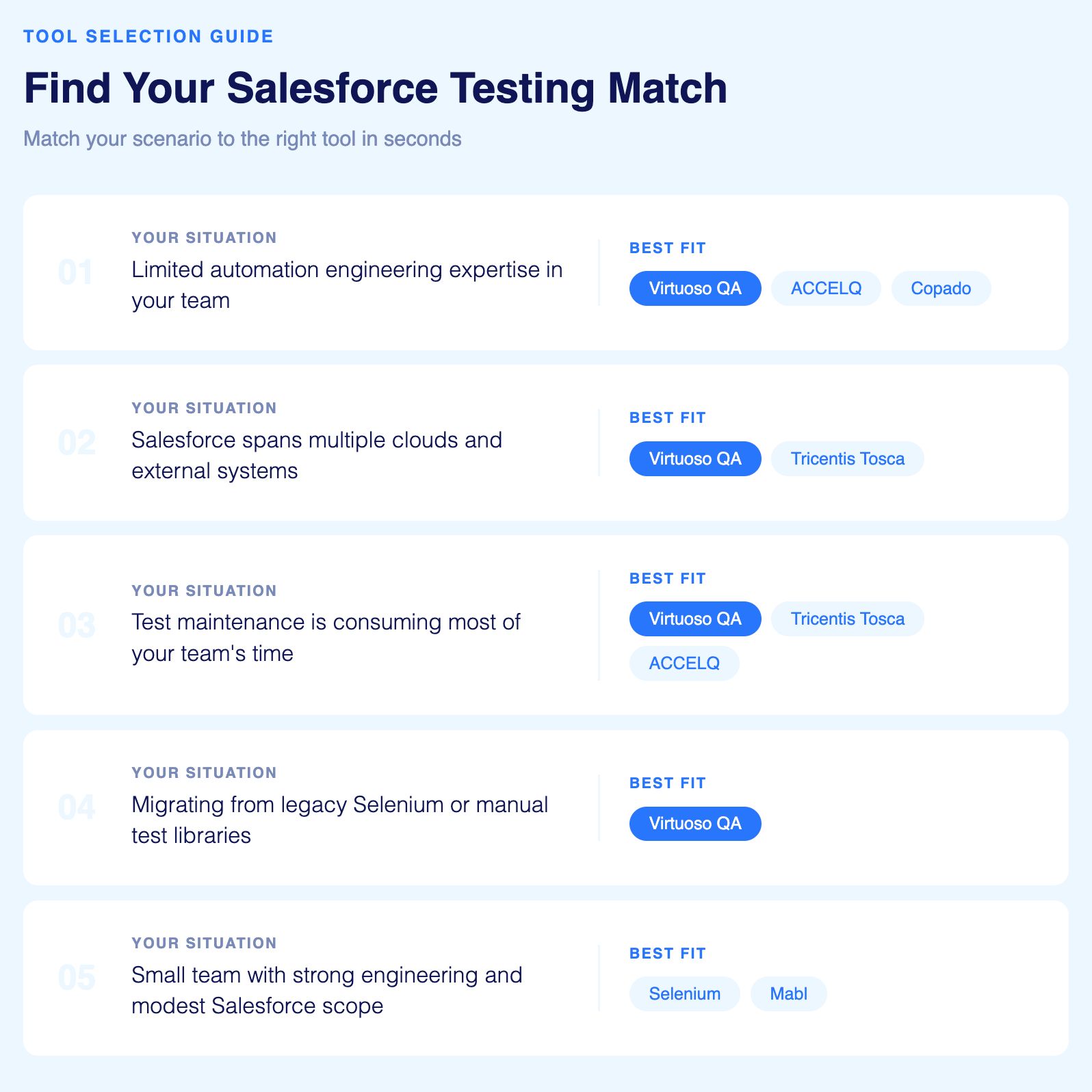
If your QA team is primarily made up of Salesforce admins, business analysts, or manual testers without scripting backgrounds, prioritise tools that support natural language or no-code test authoring.
Virtuoso QA, ACCELQ, and Copado all allow non-technical contributors to create and maintain tests without programming knowledge. Virtuoso QA goes furthest here, with plain English test authoring through the StepIQ engine that any team member can use on day one.
If your testing scope covers not just Salesforce but also integrated ERP platforms, financial systems, marketing tools, and other enterprise applications, cross-system coverage becomes the deciding factor.
Virtuoso QA and Tricentis Tosca both handle complex multi-application end-to-end journeys without requiring separate tools for each integration layer. Teams that buy a Salesforce-specific tool and a separate integration testing tool typically end up with coverage gaps at the handoff points between systems.
If your current team spends more time repairing broken scripts after every Salesforce release than writing new tests, self-healing capability is the most important criterion to evaluate.
Virtuoso QA achieves approximately 95% self-healing accuracy, automatically adapting tests when Salesforce UI elements, component structures, or page layouts change. Tricentis Tosca's model-based approach also provides strong resilience, as does ACCELQ's self-healing automation. Any of these three will reduce the maintenance burden that collapses script-based programmes over time.
If your organisation has an existing test library built on Selenium, Tricentis Tosca, or manual spreadsheets, rebuilding everything from scratch is neither practical nor necessary.
Virtuoso QA's GENerator converts existing Selenium scripts, Tosca test cases, BDD Gherkin scenarios, and manual test documentation directly into natural language Virtuoso tests that are immediately executable and self-healing. What would otherwise take months of manual migration takes weeks with no full rebuild required.
If your team is lean, technically capable, and does not need enterprise-scale parallel execution or multi-cloud orchestration, simpler options may serve you well without the investment a larger platform requires.
Selenium provides maximum flexibility with no licensing cost and works well for technically strong teams with modest Salesforce testing scope. Mabl is a practical alternative for Agile teams running high-frequency release cycles who want low-code simplicity without the complexity of an enterprise platform.


Try Virtuoso QA in Action
See how Virtuoso QA transforms plain English into fully executable tests within seconds.
